
An IDN (Internationalized Domain Name) uses characters outside basic English letters (a-z). Think accented letters and non-Latin scripts.
- Accented Latin: münchen.com
- Spanish accents: niñez.es
- Greek: παράδειγμα.com
- Cyrillic: пример.com
- Arabic: موقع.com
How to search and register an IDN at Site.eu
- Go to the domain search on Site.eu.
- Type the domain name exactly as you want it, for example münchen.
- Check the list of available extensions (TLDs).
- Choose your domain and complete checkout, just like a regular domain registration.
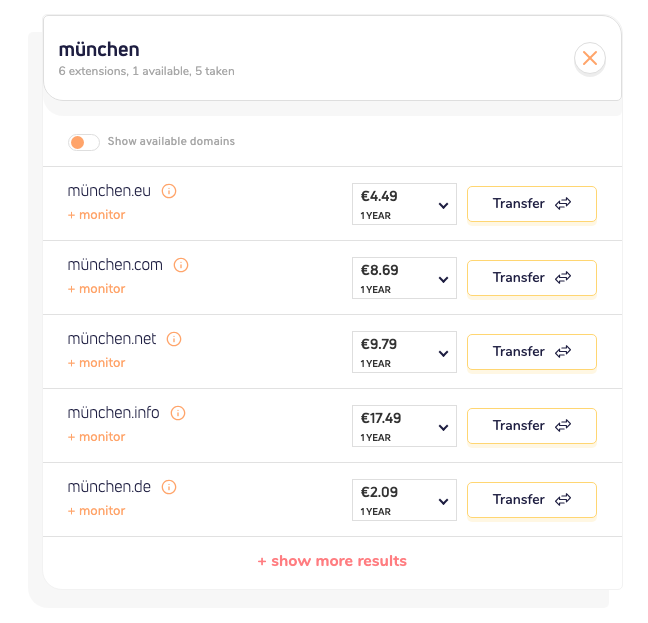
You can see the search results for münchen below. The search results showed exactly the domain name extensions that allow the characters you filled in.
What about punycode?
Good question. Browsers let people type and read the domain in normal language characters, like münchen.com.
In the background, the DNS system uses a technical encoded version called punycode. Think of it as a translation layer between human-friendly text and DNS format.
So for you and your visitors, the normal domain name is what matters. Punycode works in the background. Quietly.
Important note about TLD support
Not every extension supports every special character.
Site.eu shows which TLDs are available for your exact IDN search. So you only pick from supported options.
Quick recap
- You can search IDN domains directly at Site.eu using native-language characters.
- You register them the same way as regular domains.
- Punycode is used in the background, not as the main user view.
- TLD support depends on the extension, and Site.eu shows available matches.