

Every plan has room for a certain amount of files, email and traffic. How much of it do you use? Your dashboard shows it at a glance. Here's what the numbers mean, and what to do when you need more.
Where do you see your usage?
Log in to your dashboard, click Plans and open your plan. On the Overview tab, you find the card Plan usage.
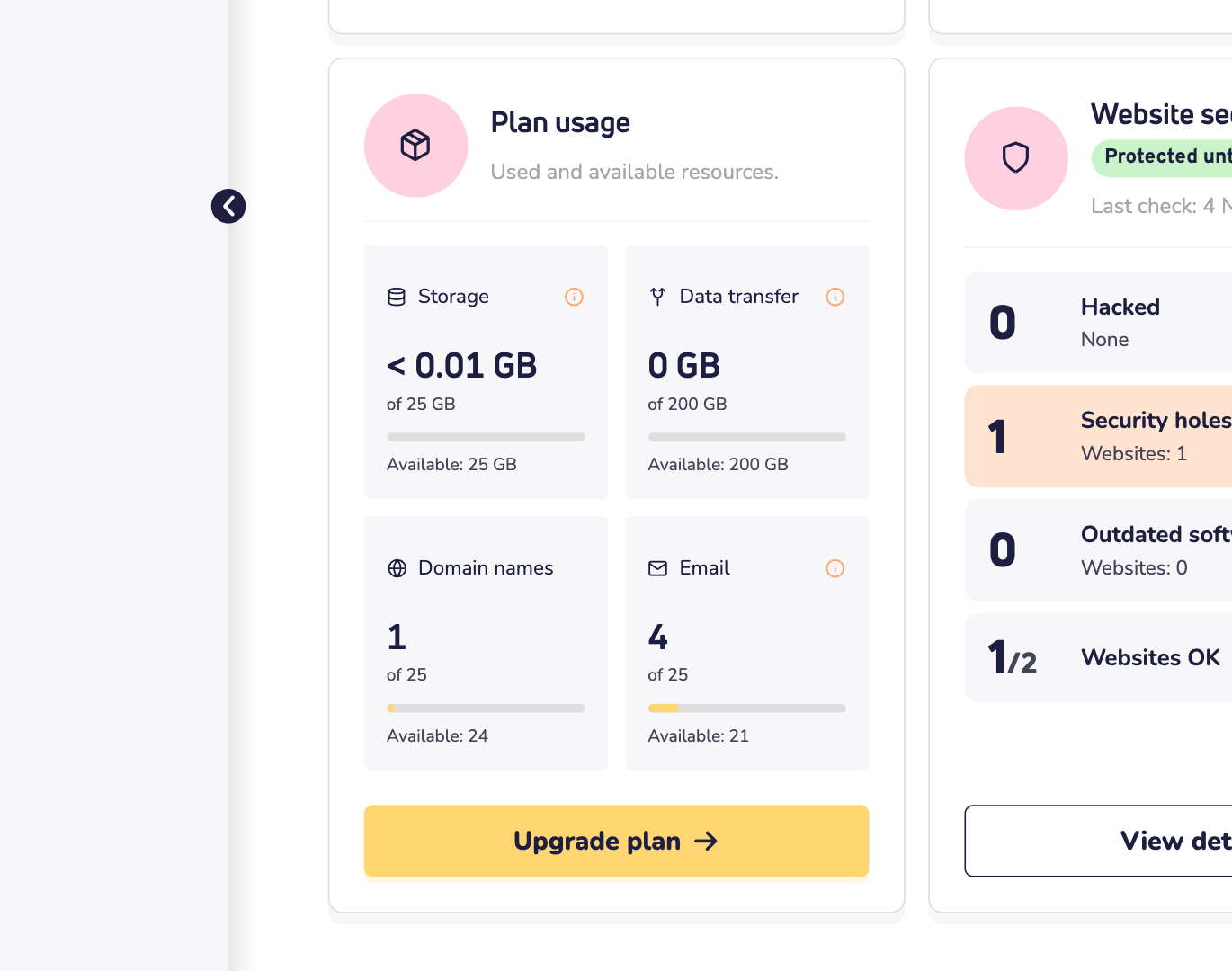
Each tile shows what you use, your limit and what's still available:
- Storage: everything you store. That's the files and databases of your web hosting, your mailboxes and your website builder websites, together.
- Data transfer: the traffic of your web hosting this calendar month. Email and website builder traffic don't count.
- Domain names: the domain names linked to the plan, also external ones.
- Email: your email addresses, forwarders and catch-all addresses.
We update the numbers once a day, at night. So a big upload shows up the next day. Do you see Partial data? Then some measurements are missing, and your real usage may be a bit higher. A tile turns orange when you've used 90% or more.
What's included in each plan?
These are the web hosting plans:
- Basic: 10 GB storage, 100 GB data transfer a month, 10 email addresses, 25 domain names, 1 CPU and 1 GB RAM.
- Starter: 25 GB storage, 200 GB data transfer, 25 email addresses, 25 domain names, 2 CPUs and 2 GB RAM.
- Plus: 50 GB storage, unlimited data transfer, 50 email addresses, 50 domain names, 4 CPUs and 3 GB RAM.
- Power: 100 GB storage, unlimited data transfer, 100 email addresses, 75 domain names, 6 CPUs and 4 GB RAM.
- Ultra: 200 GB storage, unlimited data transfer, 999 email addresses, 100 domain names, 8 CPUs and 6 GB RAM.
- Elite: 400 GB storage, unlimited data transfer, 999 email addresses, 200 domain names, 10 CPUs and 8 GB RAM.
From Plus, Redis is included too, for an even faster website. Website builder plans have their own limits. Compare all web hosting plans and website builder plans.
Good to know: there's no limit on the number of files (inodes). You can see that in DirectAdmin, under your account's limits.
What happens when you reach a limit?
- Email addresses or domain names: you can't add more. The dashboard tells you the limit of your plan is reached.
- Storage or data transfer: the tile shows how far you're over the limit. Then clean up or upgrade your plan in time, so your website and email keep running smoothly.
- CPU and RAM: a busy website can hit these limits. It then slows down, or shows a 503 error. Read why your website gives a 503 error.
Want to see CPU and RAM use? Log in to DirectAdmin and open Resource usage. It shows how much your websites used over time.
Need more room?
Click Upgrade plan on the card. You only pay the difference. Read how to upgrade your plan.
Running out of storage? Clean up first. Delete old backups, unused websites and large emails you don't need anymore.