

Anyone can put your email address in the From line of an email. Even a scammer. SPF and DKIM help receivers spot that fake email. DMARC tells them what to do with it: deliver it anyway, put it in the spam folder or refuse it.
The good news? With our email and our default settings, we add a DMARC record for you. You don't have to do a thing.
What is DMARC?
DMARC stands for Domain-based Message Authentication, Reporting and Conformance. It's a TXT record in the DNS of your domain name.
Think of a party with a doorman. SPF is the guest list. DKIM is the seal on the invitation. DMARC is the house rule: what the doorman does with a guest who has neither.
A receiving mail server checks two things:
- Does the email pass SPF or DKIM?
- Is that check for the same domain name as the one in the From line? This is called alignment.
Yes to both? Then the email passes DMARC. If not, the receiver follows the policy in your DMARC record. It can also send you reports about it.
Why the second check? A scammer can pass SPF with their own domain name, and still put your address in the From line. DMARC catches that.
Why do Gmail and Yahoo ask for DMARC?
Since February 2024, Gmail and Yahoo have stricter rules for everyone who sends them email:
- Every sender needs SPF or DKIM.
- Bulk senders need SPF, DKIM and a DMARC record. For Gmail, that's everyone who sends more than 5,000 emails a day to Gmail addresses. A DMARC record with p=none is enough. But the From line must match the domain name of SPF or DKIM.
Email that doesn't follow these rules can land in the spam folder, or be refused. So DMARC matters most when you send newsletters or many emails from your webshop.
What does a DMARC record look like?
A DMARC record is a TXT record with the name _dmarc, in front of your domain name: _dmarc.yourdomain.com. For example:
v=DMARC1; p=none; rua=mailto:dmarc@yourdomain.com- v=DMARC1: this is a DMARC record. It always comes first.
- p= is the policy, for email that fails DMARC. p=none: deliver it as usual. p=quarantine: put it in the spam folder. p=reject: refuse it.
- rua=mailto: is the address for reports.
- sp= is the policy for subdomains, like news.yourdomain.com. Without sp, the p policy counts for them too.
- adkim= and aspf= say how close the domain names must match. r (relaxed) also accepts a subdomain, like news.yourdomain.com for yourdomain.com. s (strict) wants the exact same name. Leave them out, and it's relaxed.
- pct= says for how many percent of the failing email the policy counts. The newest DMARC standard (2026) dropped it. It does no harm, though.
Good to know: a domain name can only have one DMARC record. Two records? Then receivers ignore both.
The DMARC record we add for you
Is email on for your domain name, with our default settings? Then we add this DMARC record:
v=DMARC1; p=quarantine; sp=none; aspf=r; adkim=r; pct=100;- p=quarantine: fake email in your name goes to the spam folder.
- sp=none: for subdomains, receivers deliver as usual.
- aspf=r and adkim=r: relaxed matching.
- No rua: so nobody gets reports.
Your own email passes DMARC. Our mail servers sign it with DKIM, and they're in your SPF record. We also add those records for you. Read more about DKIM and SPF.
You don't see the record in your dashboard while the default settings are on. We manage it for you.
Do you need to change it?
Usually not. Change it when:
- You want reports. Add rua, with an address of your own.
- You want to be stricter. Use p=reject. Then receivers refuse fake email in your name.
- You also send email through another service, like a newsletter tool or your webshop. First set up SPF and DKIM for that service. Without them, its email fails DMARC and lands in the spam folder.
Add reports to our record
Want to know who sends email in your name? Add rua to the end of our record:
v=DMARC1; p=quarantine; sp=none; aspf=r; adkim=r; pct=100; rua=mailto:dmarc@yourdomain.comBig providers like Gmail then send you a report, usually once a day. It's a zipped XML file, made for computers. A DMARC report service turns it into charts that people can read.
- Use a separate address, like dmarc@yourdomain.com. The reports add up.
- Use an address at your own domain name. An address at another domain name only gets reports when that domain name allows it in its own DNS.
No DMARC record yet? Start with p=none
Is your email somewhere else, and does your domain name have no DMARC record yet? Then start with:
v=DMARC1; p=none; rua=mailto:dmarc@yourdomain.comWith p=none, nothing changes for the delivery of your email. You only get reports. After a few weeks, read them. Does all your real email pass? Then change p=none to p=quarantine. Still all good after a while? Then you can go to p=reject.
How to change or add your DMARC record
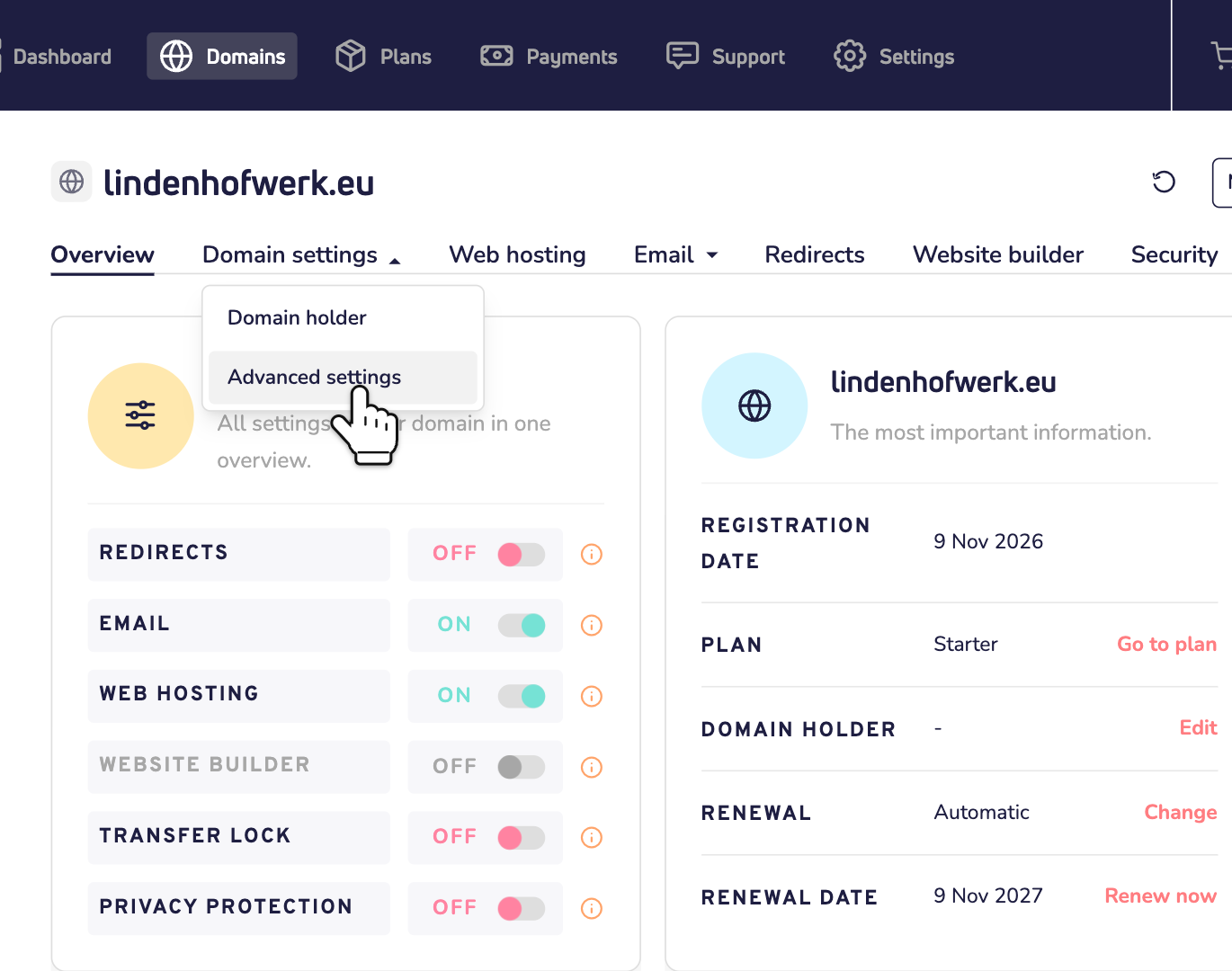
Step 1: Open your domain name in your dashboard. Click Domain settings, then Advanced settings.
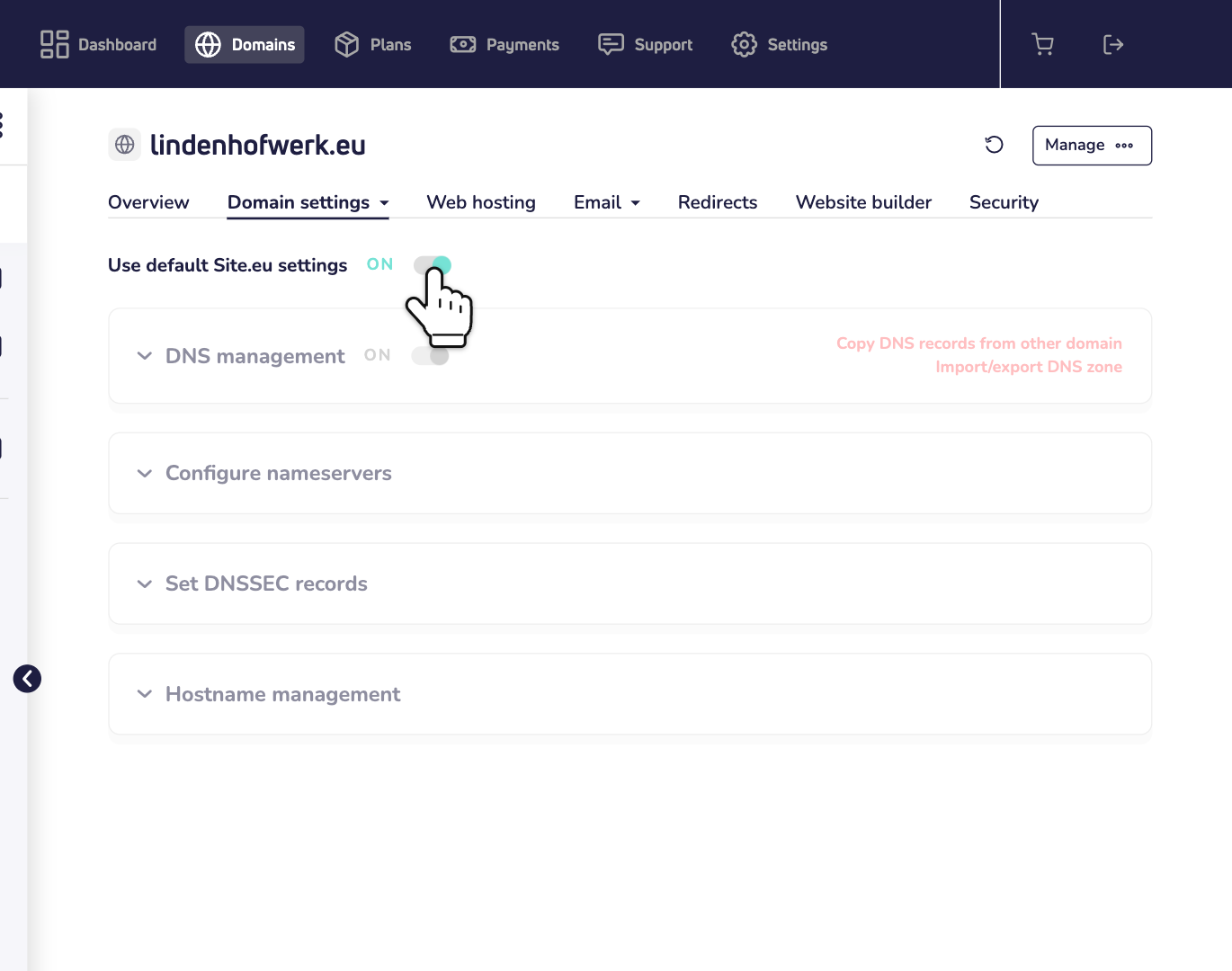
Step 2: Turn off Use default Site.eu settings and click Yes, proceed. From now on, you manage all your DNS records yourself. We no longer add or update them for you. Not sure? Read why the default settings work best for most people.
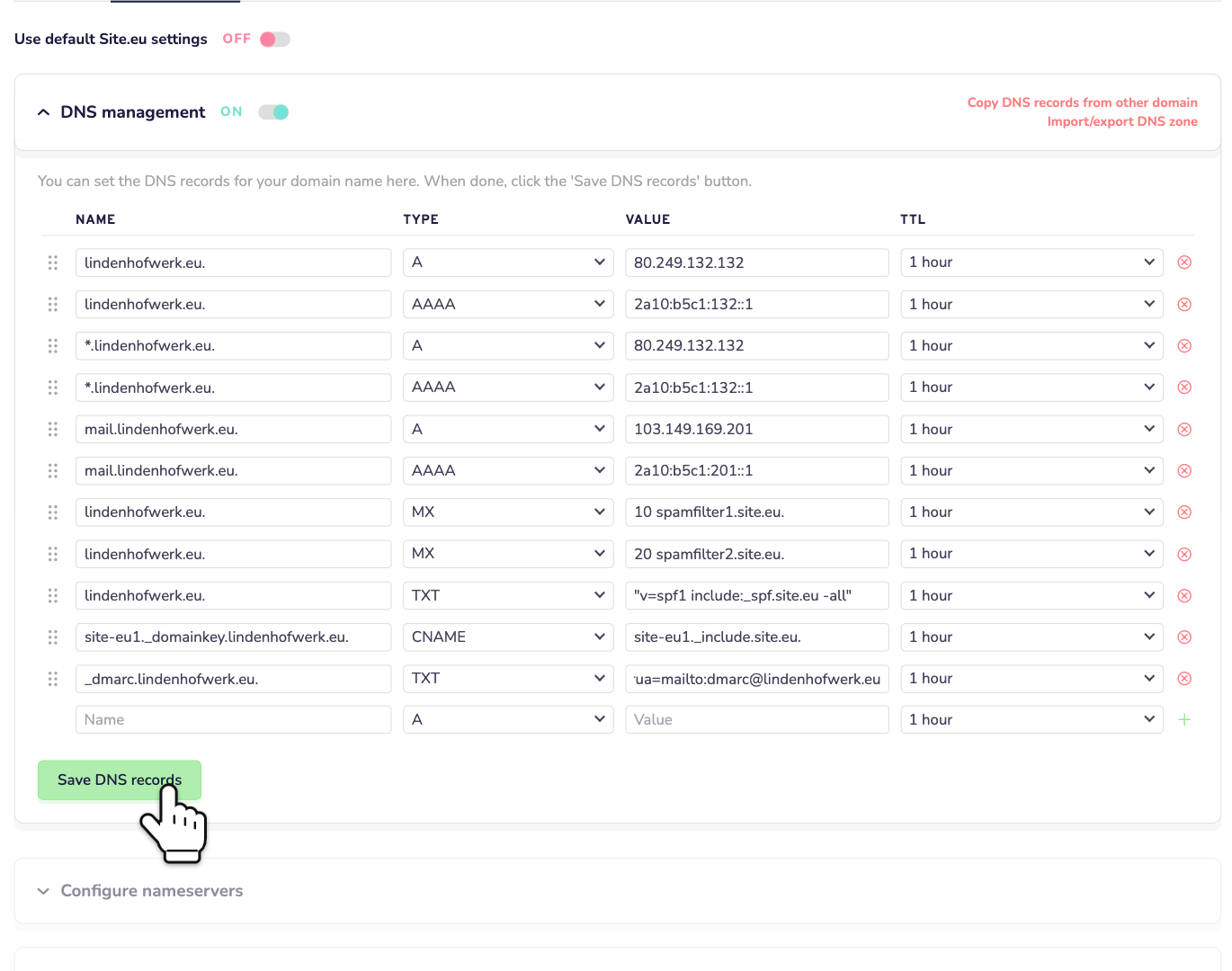
Step 3: Open DNS management. Find the row with _dmarc.yourdomain.com and TXT. Replace its whole value with your new DMARC record. You don't need quotes. No DMARC row? Then fill in the empty row at the bottom: _dmarc as the name, TXT as the type and your record as the value. Click Save DNS records.
Need more help with these steps? Read how to manage your DNS records.
After the change
- Your dashboard shows a notice about missing DNS records. Our check still looks for our own DMARC record. So it lists that record as missing. For DMARC, you can ignore that. Don't add our record next to yours: with two DMARC records, neither works.
- Turn the default settings back on, and we put our DMARC record back. That also replaces the other TXT records of your domain name itself, like a changed SPF record.
DNS somewhere else?
Does your domain name use the nameservers of another company? Then add the TXT record there. Use _dmarc as the name. Using our email? Then take our record from above, with your own rua if you like.
Check your DMARC record
Run our DNS check. Under Mail security, it shows your DMARC record and its policy. It also warns you when there's none, or more than one.
Or send an email to a Gmail address. Open it there and click More (the three dots next to Reply), then Show original. At the top, the line DMARC should say PASS.
Questions about DMARC
Does DMARC stop spam in my inbox?
No. Your DMARC record is about email in your name. It helps other mail servers spot fake email that seems to come from you.
Is p=reject better than p=quarantine?
It's stricter. Fake email in your name doesn't arrive at all. But real email that fails DMARC is refused too, for example from a newsletter tool that isn't set up for your domain name. So only switch when your reports show that all your real email passes.
How fast does a change work?
Usually within an hour. DNS servers can keep the old record for as long as its TTL. In our DNS, that's 1 hour.