

Your cart is ready? Then you pay in the last step of the checkout. You choose how: iDEAL, credit card, PayPal, bank transfer and more. Every payment method shows its fee and how fast we process your payment. So you know what you pay before you click.
Pay for your order
Step 1: Go through the checkout until you reach Choose payment method. Not sure how? Read how to order a domain registration or transfer. Click the payment method you want. Under its name, you see its fee and how fast we process the payment.
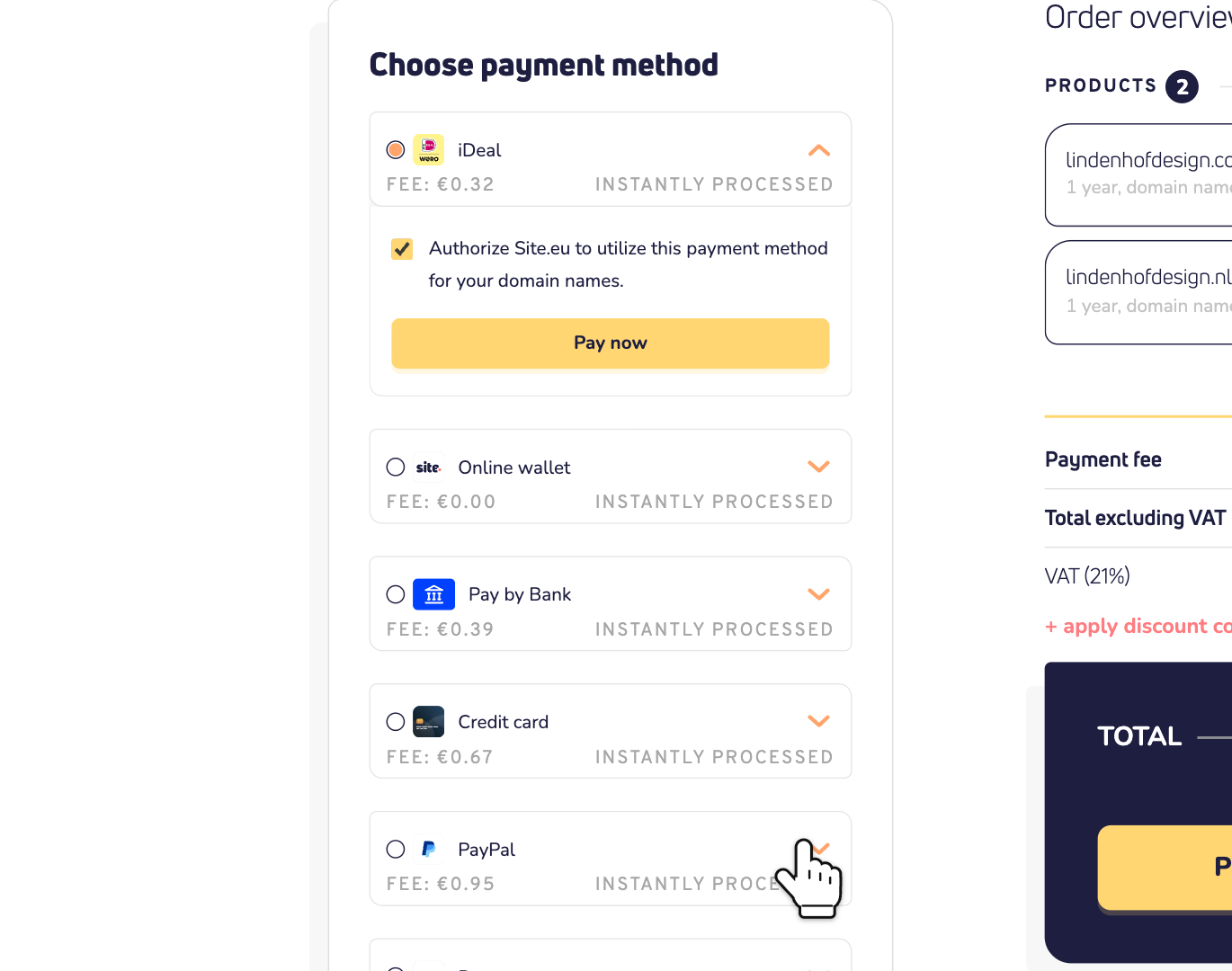
The payment method you used last is at the top. It's already selected.
Step 2: Check the Order overview. The fee of your payment method is in it, as Payment fee. Then click Pay now.
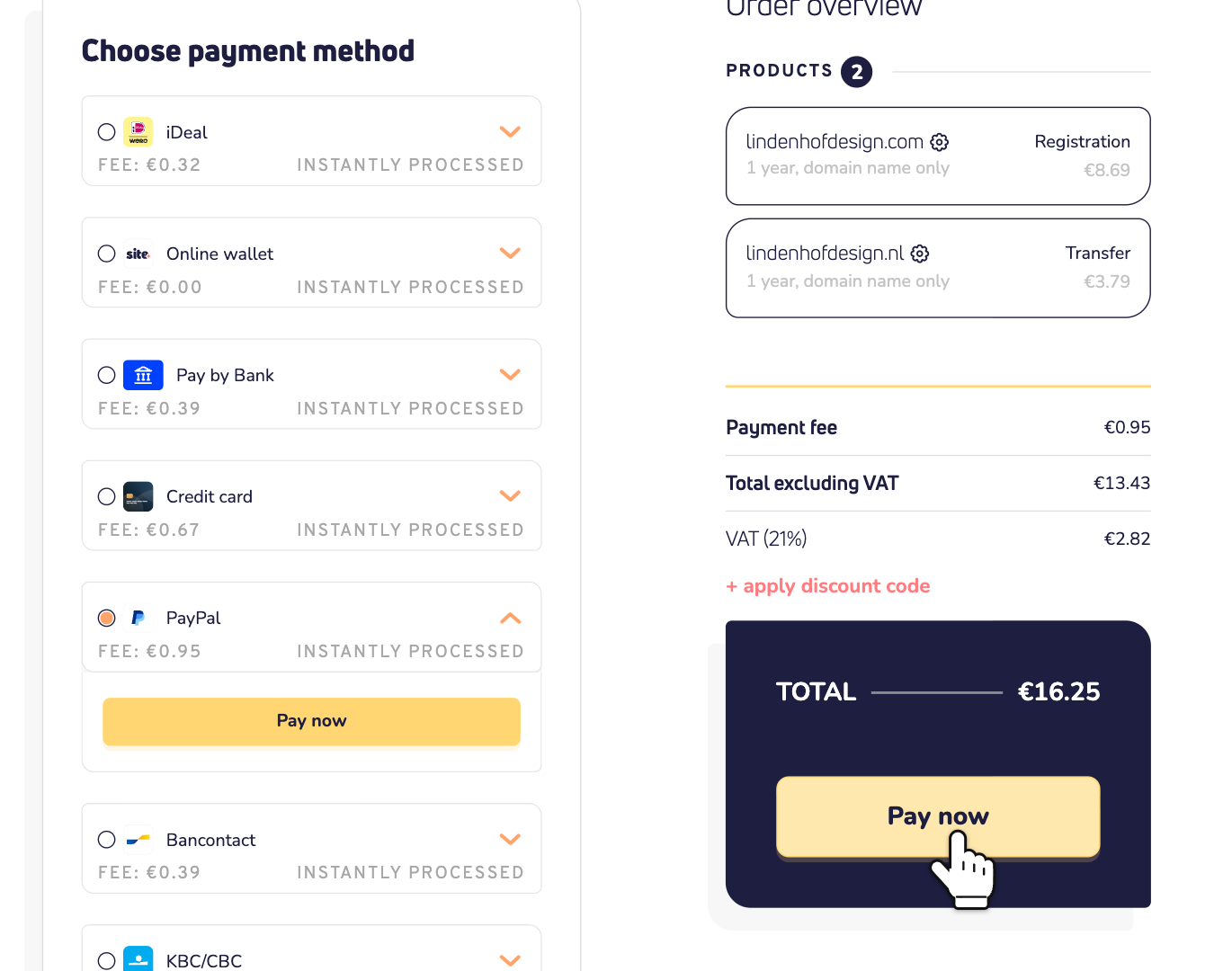
Step 3: Finish the payment. With a bank method, such as iDEAL or Pay by Bank, you approve it in your bank's app or website. With PayPal, you log in to PayPal. Paying by credit card? Then you type your card details on the payment page itself. Done? Then you're back with us, and we start on your order.
Which payment methods are there?
- iDeal: for Dutch bank accounts.
- Bancontact: for Belgian bank cards.
- Belfius and KBC/CBC: for customers of these Belgian banks.
- EPS: for Austrian banks.
- Pay by Bank: choose your bank and approve the payment there. It works with banks in most of Europe.
- Credit card: pay with your card.
- PayPal: pay with your PayPal account.
- Online wallet: pay from your balance with us. Read all about the online wallet.
- Bank transfer: you transfer the money yourself, with our payment reference.
- Direct debit and Authorized credit card: only when you gave us an authorization. More on that below.
What does each payment method cost?
Some payment methods have a small fee. You see it next to the payment method, and in the order overview. These are the fees:
- Bank transfer and Online wallet: free
- Direct debit: €0.25
- iDeal: €0.32
- Bancontact: €0.39
- Belfius, KBC/CBC and Pay by Bank: 0.9% + €0.25
- EPS: 1.5% + €0.25
- Credit card: 2.75% + €0.25
- PayPal: 4% + €0.35
The percentage is of your order total, including VAT. VAT is added to the fee too. Your invoice shows the fee on its own line. Good to know: if you ever get a refund, the fee isn't part of it.
Which payment methods are instant?
Almost all of them. Next to them, you see Instantly processed. As soon as you've paid, we process your order.
- Bank transfer is slow. It can take up to 3 days. So don't use it for a new domain name, or for a product that expires soon. Read how fast a bank transfer is processed.
- Pay by Bank is usually instant too. Some banks take up to 3 working days. Then the page says we're waiting for your bank. Don't pay a second time in the meantime.
Don't see a payment method?
- Online wallet: only shows when your balance is high enough for this order. Top it up first, or choose another payment method.
- Direct debit: only shows when you have a direct debit authorization. And not for new domain names, domain transfers or wallet top-ups.
- Authorized credit card: only shows when you have authorized your credit card. And not for new domain names or domain transfers. Then you type your card details as usual.
- Bank transfer greyed out? You're renewing something that expires within 7 days, or has already expired. A bank transfer could arrive too late. Choose a faster payment method.
- Credit card missing? You can only pay a certain amount by credit card within 24 hours. Choose another payment method, or try again later.
- Topping up your wallet? Then you can't pay with the online wallet itself or by direct debit.
Pay automatically next time
Don't want to pay every renewal by hand? Choose iDEAL, Bancontact, Belfius, KBC/CBC, EPS, Pay by Bank or credit card. Under the payment method, you see the box Authorize Site.eu to utilize this payment method for your domain names. It's already ticked. Leave it that way, and we can collect your automatic renewals. Read how to issue a direct debit authorization or how to authorize your credit card.