
You renewed your domain name. Maybe even for a few years at once. And still you get an email: your domain name will expire within 34 days, or within 9 days. Confusing? Yes. A problem? Usually not.
First, check one thing: the renewal date in your dashboard. That's the date that counts.
Check your renewal date
Step 1: Log in to your dashboard and click Domains.
Step 2: Open your domain name. Under Renewal Date, you see until when your domain name is paid for.
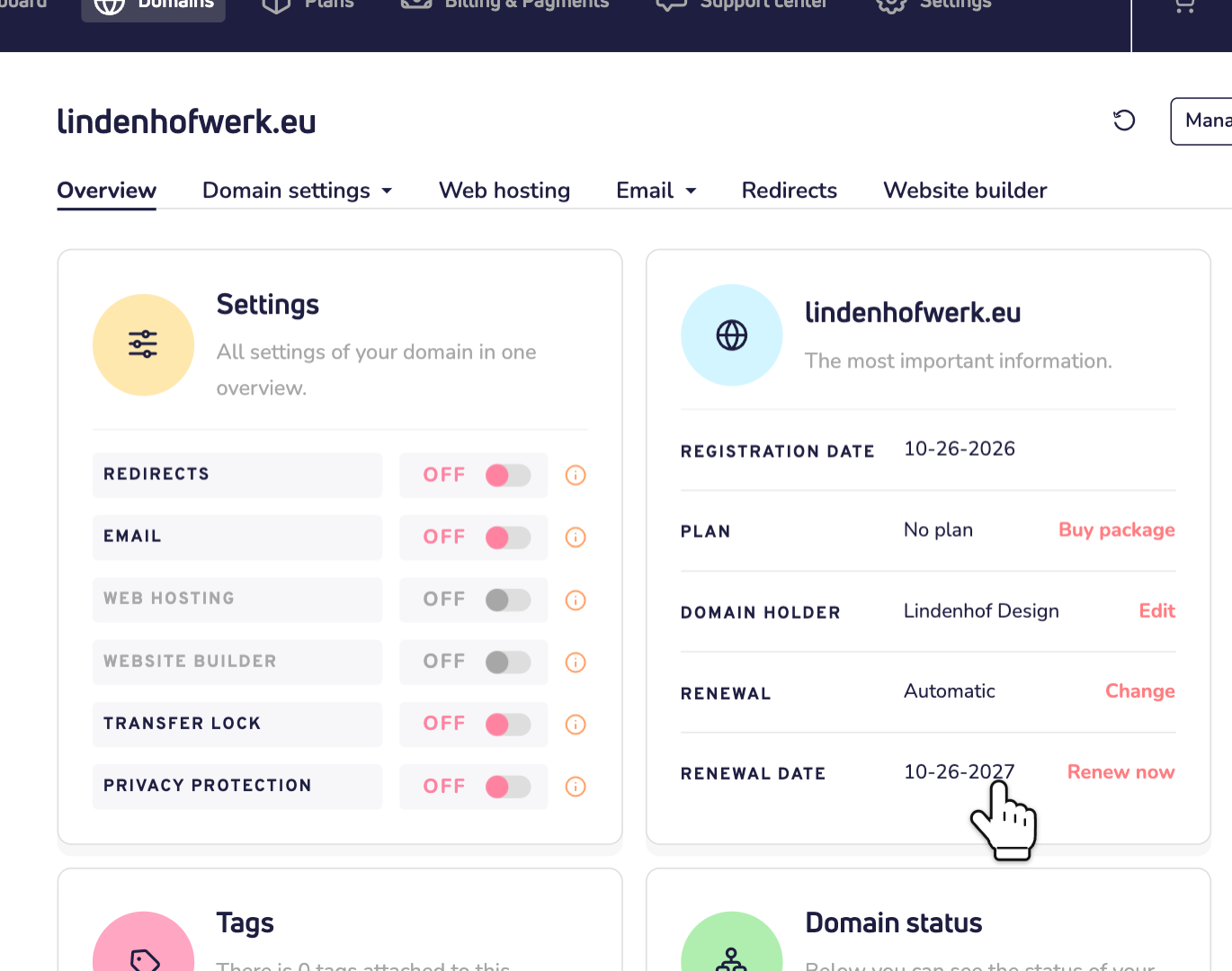
Is that date later than the date in the email? Then you can ignore the email. You don't need to pay anything.
Why did I get the email?
Most of the time, the email shows the date of the registry. That's the organization that manages all domain names with your extension, like .eu or .nl.
Here's how it works. Did you pay for several years? Then we renew your domain name at the registry one year at a time, around the expiry date. So the registry's date is often earlier than the date you paid up to. The email shows the registry's date. Your dashboard shows the real one. Read more about how the renewal of a domain name works.
Some registries also send you a warning themselves. And some extensions can only be renewed on the expiry day itself. In both cases, the date in your dashboard is the one that counts.
Other reasons
- Your payment isn't processed yet. A bank transfer can take up to 3 days. Always use the exact payment reference, or the money comes back. Read how fast a bank transfer is processed.
- Automatic renewal couldn't take the payment. Renewal is set to Automatic, but there's no money in your wallet and no card or direct debit linked. You then get an email that we couldn't renew your domain names. Pay the renewal by hand this time, or link a payment method under Billing & Payments.
- You renewed your plan, not your domain name. Or the other way around. A plan and a domain name are separate products, each with its own date.
- You transferred your domain name to us. Your old provider may keep sending reminders and invoices. Read what happens to your remaining time after a transfer.
Watch out for fake emails
Scammers send fake renewal emails too. They want you to act fast: pay within a day, or update your card now. Not sure an email is real? Don't click its links. Log in to your dashboard yourself and check your renewal date there. We never ask for your password or bank details by email.
Still not sure?
Contact us. Send us the domain name and forward the email you got. Add the email address of your account and your support PIN. We'll check it for you.