

A hostname (or host name) is the name of a server on the internet, like www.example.co.uk or mail.example.co.uk. Here's what it means and how to find yours.
What is a hostname?
Every server on the internet has an IP address, like 193.0.6.139. Great for computers. Hard for people. So a server also gets a name: the hostname.
Think of the contacts in your phone. You call "Mum", not 07700 900123. Your phone looks up the number for you. A hostname works the same way.
A few examples:
- www.example.co.uk: the server of a website
- mail.example.co.uk: the mail server of a domain name
- ns1.site.eu: one of the nameservers of Site.eu
Hostname or host name? Same thing. You'll see both.
Hostname vs domain name vs FQDN vs IP address
These four terms look alike. But they don't mean the same thing:
- Domain name: the name you register, like example.co.uk.
- Hostname: the name of one server within a domain, like www or mail. People often mean the full name too, like mail.example.co.uk.
- FQDN: the full name of a server, with every part in it: mail.example.co.uk.
- IP address: the number of a server, like 193.0.6.139. A hostname points to that number.
How does your computer know which IP address belongs to a hostname? DNS takes care of that. An A record links a hostname to an IPv4 address. An AAAA record does the same for IPv6.
It works the other way round too: reverse DNS. A PTR record links an IP address back to a hostname. You can see it with our IP lookup.
Does an app ask for a "hostname or IP address"? Then use the hostname if you can. An IP address can change. The name stays the same.
What is an FQDN?
FQDN stands for fully qualified domain name. It's the complete name of a server. So not just "mail", but mail.example.co.uk.
Strictly speaking, an FQDN ends with a dot: mail.example.co.uk. (dot included). That last dot stands for the root, the top of the DNS. In practice, you almost always leave it out.
Does a program ask for a hostname, host or server? Then enter the FQDN. So mail.site.eu, not just "mail".
How a hostname is built
A hostname is made of parts with a dot between them. You read it from right to left, from big to small. Take mail.example.co.uk:
- .co.uk is the extension. Its last part, .uk, is the top level domain (TLD).
- example is the name you register. Together with .co.uk, that's your domain name.
- mail points to one server. You also call mail.example.co.uk a subdomain of example.co.uk.
A few rules:
- Only letters, numbers and hyphens. No spaces or other characters.
- Each part can be up to 63 characters long. The full name up to 253.
- Capitals don't matter. Mail.Example.co.uk is the same as mail.example.co.uk.
You create a new hostname, like shop.yourdomain.com, with a DNS record. Read how to manage your domain name's DNS records.
Every web address has a hostname too: the part right after https://. In https://www.example.co.uk/contact, that's www.example.co.uk. Read more in what a URL is.
Hostnames for email: incoming and outgoing server
Want to read your email in Outlook, Apple Mail or on your phone? Then the app asks for two hostnames when you set it up:
- Incoming server (IMAP or POP3): where your app picks up your email.
- Outgoing server (SMTP): what your app uses to send email.
At Site.eu, it's the same hostname for both: mail.site.eu.
- IMAP (recommended): mail.site.eu, port 993, SSL/TLS
- POP3: mail.site.eu, port 995, SSL/TLS
- SMTP: mail.site.eu, port 465 with SSL/TLS, or port 587 with STARTTLS
Your username is your full email address. You'll find every setting in setting up email: POP, IMAP and SMTP information.
Every email provider has its own hostnames. Gmail, for example, uses imap.gmail.com and smtp.gmail.com. So always use the hostnames of the provider your email address is with.
Your domain name's MX record holds a hostname too: the one of the mail server that receives your email. It has to be a hostname, not an IP address. Our DNS check checks this for you.
Your web hosting's hostname: FTP, SSH and DirectAdmin
Do you have web hosting with Site.eu? Then your website runs on a server with its own hostname, for example da005.site.eu. The number differs per server. You need that hostname for:
- FTP and SFTP: enter it as the host or server. The FTP port is 21.
- SSH: you log in with ssh username@da005.site.eu.
- DirectAdmin: your control panel is at https://da005.site.eu:2222.
Careful: for FTP, enter your server name, not your domain name. Read how to connect with FTP.
How to find your hostname
In your dashboard
- Your mail server: open your domain name and click Email. Under Email information, next to mail server, you see the hostname: mail.site.eu.
- Your web hosting server: click your plan in the list on the left and open the Web hosting tab. Under Web hosting information, you'll find Go to control panel. It links to https://da005.site.eu:2222 or a similar address. Take off https:// and :2222, and you have your hostname.
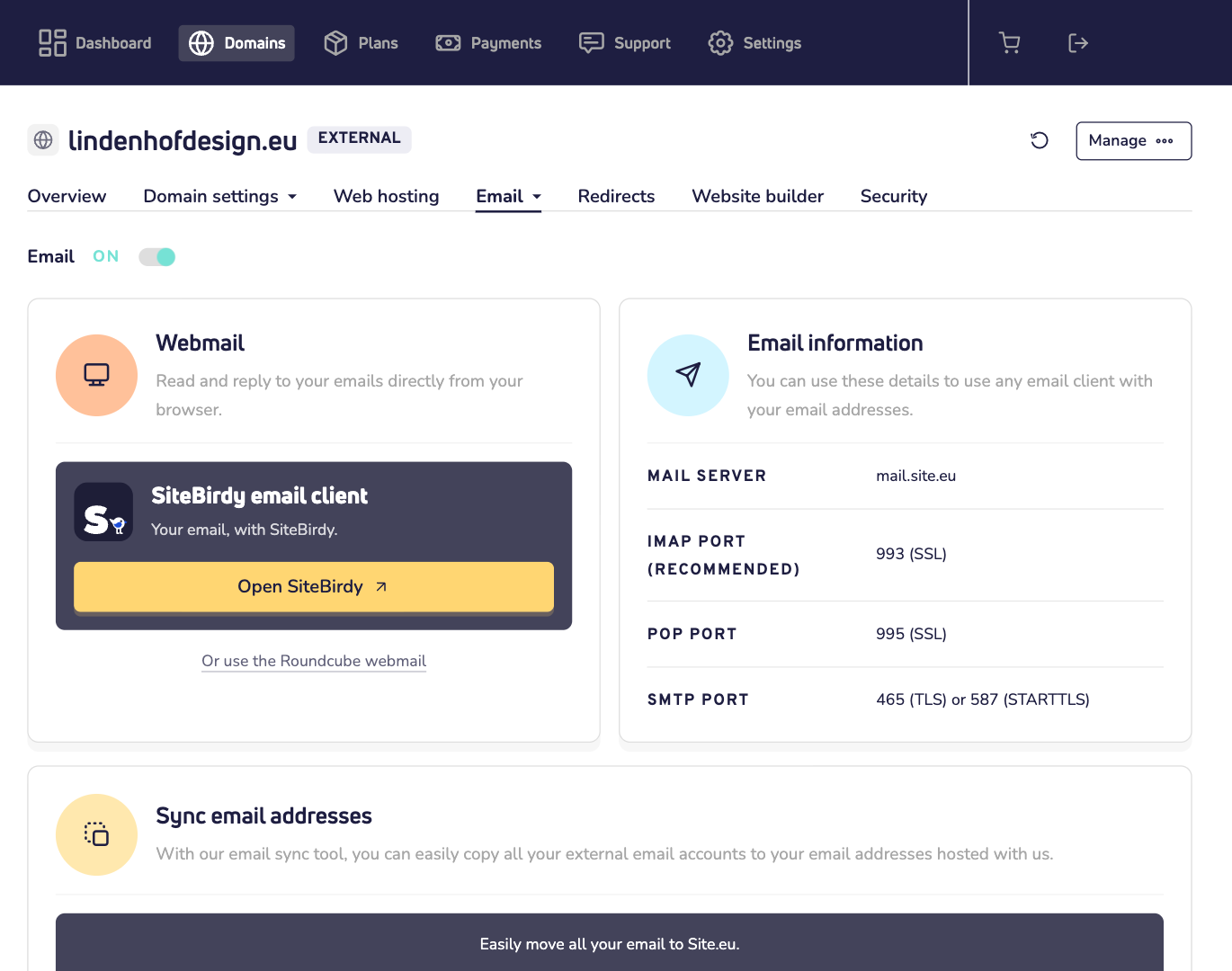
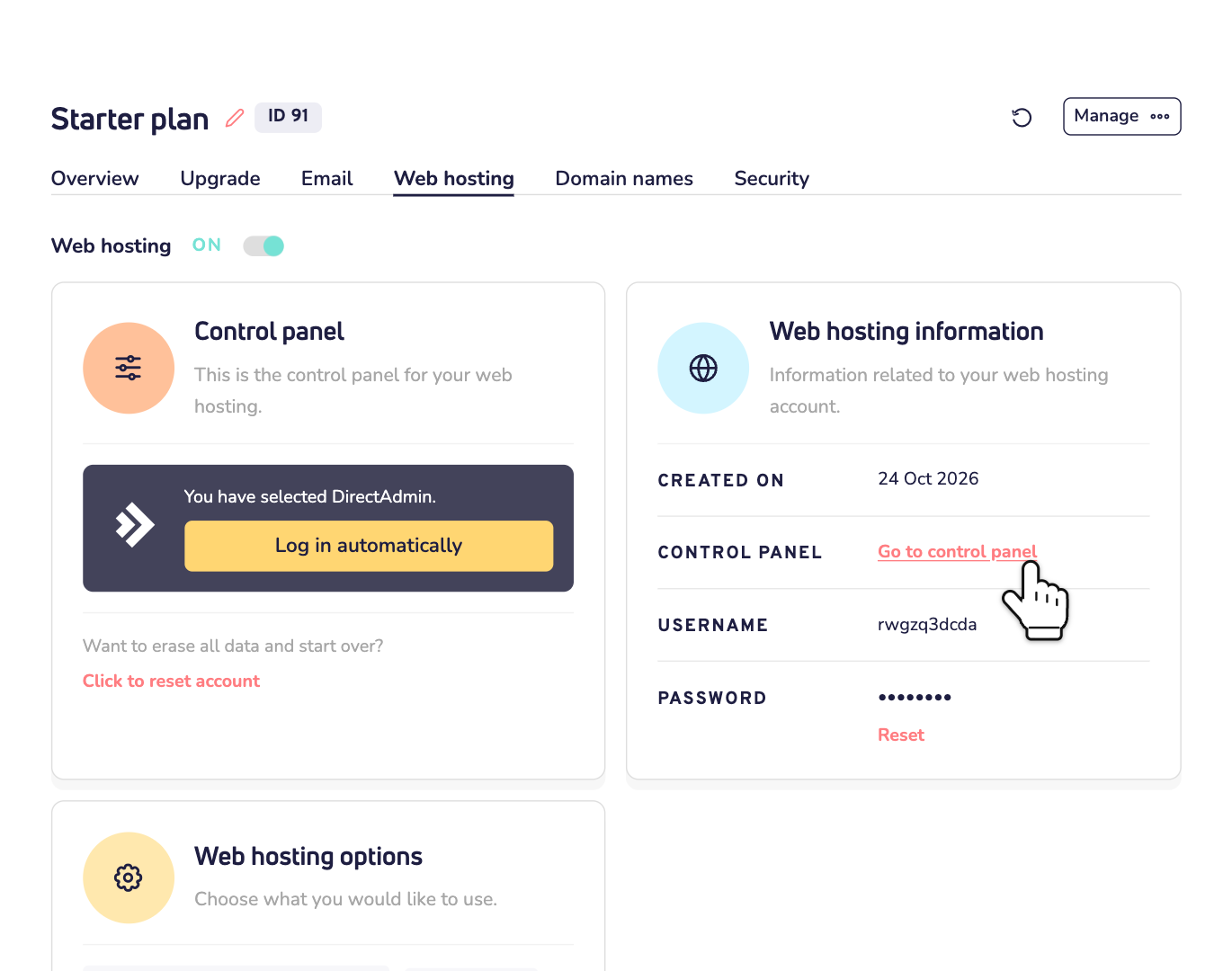
Under Domain settings > Advanced settings, you also see Hostname management. There you register hostnames to use as nameservers for other domain names, like ns1.yourdomain.com. That only works once you turn off Use default Site.eu settings. Almost no one needs this.
On Windows
Your own computer has a hostname too. Windows calls it the device name. Open Settings > System > About. Your PC's name is at the top. Quicker? Type "hostname" in Command Prompt and press Enter.
On a Mac
Choose Apple menu > System Settings > General > Sharing. At the bottom, you see the Local hostname, for example My-Mac.local. You can change it there too.